
The Modules – Orasis Base System
Patient records – Click Here for Screen Shot
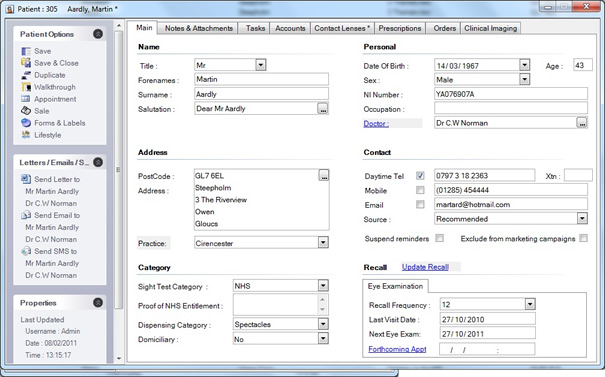
- Easy access to all your patient data
- Simple and easy to use
- A simple step-by-step “walkthrough” taking you and your staff through the patient journey
- Full label facility
- Smart Links to navigate through the system to view accounts, prescription and order history, contact lens record and making appointments
- Notes and attachments including clinical imaging
- Search facility for finding existing patients
- Postcode Look-Up
- Send letters and emails to patients, doctors and suppliers.
- Task History – builds a history of all contact to the patient ie SMS, calls, email
- Make a sale via the patient record
- Lifestyle Questionnaire: Know your patient and recommend the best product to match their lifestyle
Recall System
The reminder system is arguably the most important communication your practice has with its patients. The tool to remind a patient when they are next due for an appointment is so important.
So, it is essential that the recall letter generates the maximum number of appointments and dispensing opportunities.
The effectiveness of the system can be determined by measuring the response rate. On average this is usually about 30-40% within three months of the first letter being sent. A second letter sent three months later, may double the number of responses. This is easily done with the Orasis recall system.
You can then follow this by a third letter after a further six months.
Flexibility is available with this module that allows you to switch from a simple reminder system to a more advanced system for your growing practice or the more mature practices. Within the advanced module you can produce customised reminders for different patient categories and ages.
Orasis Recall System integrates with Microsoft Word and Outlook so most staff will be familiar with this and therefore customising your own letters is simple to do.
A personalised recall letter will not only fulfil the clinical objective regarding the importance of the eye examination, but can provide details of why your practice is the one to go to!
This module will considerably reduce your workload and allows letters to be sent on a daily basis rather than once a month and hence spread the appointments more evenly throughout the month.
Prescription History
The patient’s prescription history is accessible by a click on the ‘prescription history’ tab which is located on the Patient’s record card. It will have been entered usually by the Optometrist in the consulting room in ‘Step 2’ of the ‘walkthrough’ and this then stores and forms the prescription history for the patient.
Walkthrough
This provides a step by step ‘wizard’ which is picked up from the diary or the patients record card in the Consulting room. It prompts in four simple steps to eliminate any potential errors, for example: not setting a recall date.
Step 1: The patient having been attended on arrival then sits in Pending Walkthrough. Step 1 requires the Optometrist to input the next recall date for the patient.
Step 2: Enter the prescriber’s name and prescription details and print out a copy of the prescription
Step 3: This is the Dispensing and order screen and is usually on a terminal in the dispensing area.
Step 4: Sale Screen which allows you to take a deposit and print out a receipt.
The completed order then sits in the outstanding order list and turns ‘red’ after the number of days quoted for delivery have lapsed for you to chase.
Full Integration with Microsoft Office
Compatible with all editions of Mircosoft Ofiice suit.
Contact Relationship Management
Fully featured CRM components for tracking and planning all contact with Patients and Suppliers.
Clinical Imaging Integration
” Pictures speak a thousand words “
Being able to show and explain your diagnosis to a patient can give so much strength to the Optometrist’s status as a modern health professional, that patient will remember the ‘picture’ more than what you say and what’s more – they will be more excited and should spread the word about your practice.
The image you require can be retrieved and captured from the most modern fundus cameras and slit-lamps quite easily.
The image is captured directly from the equipment computer and then is stored and is accessible from the patient’s record. The images are available to all computers and can be adjusted, compared, printed and emailed. The popular systems are supported including Topcon and Nidek.
Important information such as the Date and time of capture are detailed together with any comments are recorded so changes can be easily monitored over time.
Summary of benefits
- Less paper as stored on the patient record
- Referrals can be made via email by attaching image or printed
- Integrates with Microsoft Word to produce GP referral letters incorporating the clinical image